ScaleBarNumberPlacement Enumeration
Controls the placement of the numeric labels of a ScaleBar.
Namespace: Carmenta.Engine
NuGet/Assembly: Carmenta.Engine.5.16.2.nupkg (in the CECore assembly)
NuGet/Assembly: Carmenta.Engine.5.16.2.nupkg (in the CECore assembly)
Syntax
public enum ScaleBarNumberPlacementValues
| Value name | Value | Description |
|---|---|---|
| Above | 0 | Above the scale bar. |
| Below | 1 | Below the scale bar. |
| Left | 2 | Left of the scale bar. |
| Right | 3 | Right of the scale bar. |
Remarks
When the ScaleBar has only one division, the number zero will not be displayed, so you get only a single number label. It is only in this case that the number placements Left and Right are allowed.
In the table below, the four possibilities are illustrated with a ScaleBar with style = Comb. The teeth of the comb – the tick marks – will point up or down toward the numbers if possible, otherwise up.
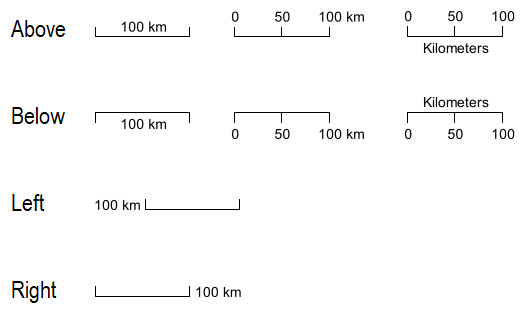 |
Examples of the four possible number placements.
Platforms
Windows, Linux, Android